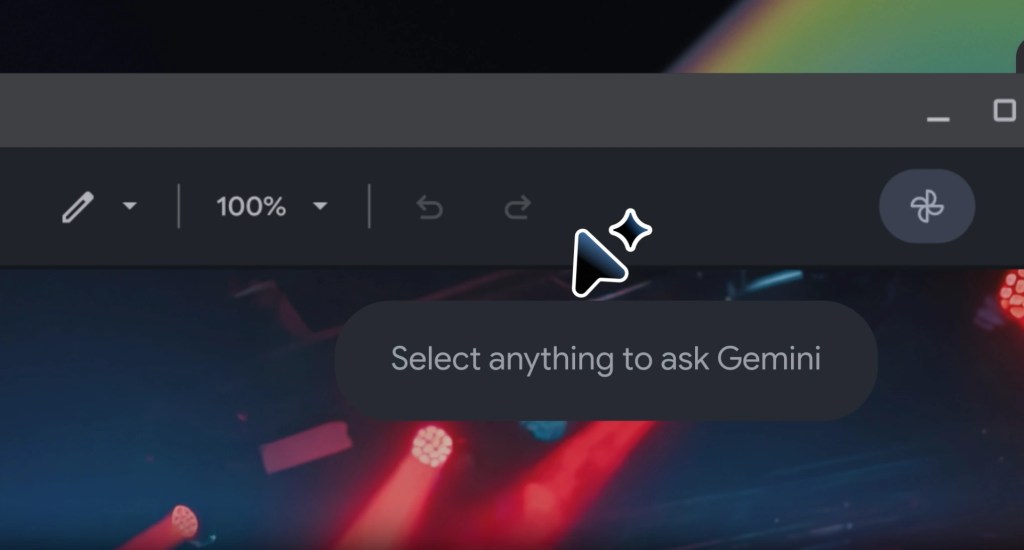
Google just gave everyone an early look at Googlebook’s signature feature, and it did it almost by accident. The Magic Pointer app has appeared on the Google Play Store months ahead of the Google Book launch, and it’s already sitting at over 1,000 downloads even though not a single piece of compatible hardware exists yet.
I’ve been following Google Books since it was first announced in May, and honestly, this listing tells you more about the launch than the keynote did. The Play Store description keeps it simple: select anything on your screen to get contextual AI suggestions and seamlessly get help from Gemini. That’s it. No marketing fluff, just a straightforward pitch for what is essentially Google’s answer to the traditional mouse cursor.
What the Magic Pointer app actually does
Magic Pointer isn’t a standalone app in the way most people think of apps. It’s a system-level tool that wraps your cursor in a small Gemini spark badge and turns it into an entry point for AI actions. Point at something on your screen, and instead of just clicking, you get a contextual menu built around whatever you selected.
The listing’s own mockups explain it best. Highlight a photo of a houseplant, and Magic Pointer offers to search with Google Lens, generate a new image through the Nano Banana engine, or pull up a direct buy now link. It’s essentially Android’s Circle to Search feature, rebuilt from the ground up for a trackpad and a full desktop screen instead of a phone.
What I find interesting here is how closely this lines up with what Google already promised back in May. At the original unveiling, Google’s Alexander Kuscher described wiggling the cursor over a date in an email to instantly create a calendar meeting or selecting two images, say, a living room and a new couch, to have Gemini visualize them together. The Play Store listing is the first real proof that those demos weren’t just stage tricks.
A sneak peek at the Google Books interface
Here’s what’s interesting though: the app listing didn’t just reveal the pointer feature. The screenshots also show Chrome running inside the Googlebook interface, and it looks remarkably close to the current Android tablet experience. There’s a persistent system status bar along the bottom, similar to what you’d see on a Pixel Tablet, which suggests Google isn’t reinventing Android for bigger screens so much as layering smarter tools on top of what already works.
This is one of those things I genuinely got excited about the moment I saw it. Google previously confirmed in May that Googlebook runs on a unified Android tech stack rather than a separate ChromeOS build, and these leaked mockups back that up completely. The interface isn’t a new operating system from scratch. It’s Android, stretched, refined, and handed a proper desktop layout.
Why releasing through the Play Store matters
What most articles missed is the strategic reasoning behind this move. By hosting Magic Pointer as its own Play Store listing rather than bundling it into a system update, Google gains the ability to push new Gemini features, bug fixes, and interface tweaks whenever it wants. No waiting on a full OS release, no coordinating a firmware rollout across five hardware partners. Just an app update, the same way Google pushes changes to Gmail or Maps.
Sources suggest this pattern will extend to other core Googlebook features too, not just the pointer. If Google treats Create Your Widget the same way, expect that tool to show up on the Play Store on its own well before launch day as well. It’s a smart way to iterate fast on software while the hardware partners, Acer, Asus, Dell, HP, and Lenovo, finish their side of the work.
The app currently carries the package name com.google.android.desktop.gpointer.app and sits at version 1.0.260708, having first gone live on June 9. It’s restricted to Googlebook hardware, so regular Android phones and tablets can’t install it, which is honestly part of why nobody caught the listing sooner. It simply wasn’t visible or usable for most of the Play Store’s audience.
Skepticism is already building
Not everyone is convinced this matters yet. Industry insiders hint that system-level AI tools like this one have a rocky track record of actually changing how people work. Critics have already pointed to Microsoft’s Click to Do feature in Windows 11 as an example of a similar concept that never generated much real demand, despite being baked directly into the operating system.
After looking into this more closely, I can tell you that the skepticism isn’t unreasonable. A smart cursor is a neat demo, but demos and daily habits are very different things. If the current trajectory holds, Magic Pointer’s real test won’t come from a Play Store listing or a handful of mockups. It’ll come once actual Googlebooks are in people’s hands this fall and Google has to prove the feature earns a place in someone’s everyday workflow rather than becoming a gimmick people disable in the first week.
What comes next for Google Books?
Google confirmed back in May that the first Googlebooks would ship this fall through its five hardware partners, positioning the line as a genuine successor to the Chromebook after fifteen years. Pricing and full specs still haven’t been announced, and Google has stayed quiet on exact launch dates beyond the general fall window.
I didn’t expect this angle when I started researching, and that’s exactly why it matters. A polished app listing showing up two full seasons before launch tells you Google is confident enough in the software to let it leak, even if the hardware story is still under wraps. Having used similar early previews from Google before, this felt like a genuine signal rather than a marketing stunt.
For now, anyone curious can already try a limited version of the Magic Pointer concept through demos in Google AI Studio, even without owning a Google Book. It’s not the full experience, but it’s the closest thing to a hands-on preview available before the real hardware arrives. As more Google Book details surface this fall, Magic Pointer looks likely to be the feature Google leans on hardest to convince buyers this new category is worth a second look.


